Showing posts with label vinyl. Show all posts
Wednesday, February 24, 2021
Monorail Room Decor
My youngest is all about Disney, especially Mickey and anything to do with the parks. He has special needs and making choices like decorating his room is a big deal. When I showed him the monorail from Designs by Miss Mandee, he was thrilled. He already has a banner he made over his bed, so I asked if he wanted monorail trains around the top of his room. He was so excited picking each color for the striped and I resized them for the wall. The end cars ended up
being 11.5 inches long. I had to tweak the design so I could layer the black windows on top, rather than cut whole black cars. Because they were so big, we didn't bother with transfer tape and just peeled and placed like regular stickers. The walls are not smooth so it took a bit of work to get them to adhere but they are fabulous! Thanks for looking! April
Labels:
Cricut,
Disney,
home decor,
vinyl
Tuesday, January 19, 2021
Fall Drama Dept Starbucks Cups
Our high school kids are trying their best to make the most out of the limits set for them. My son is a senior and has lost the spring musical, prom, robotics and many other activities. They decided to do a online play via Zoom called Clue:Stay Home Edition. Usually the Drama Booster arrange some fun activities for the kids, like a headshot fundraiser and a candy gram sale (treats are donated by the parents and the audience can by snacks for specific cast members and crew - because teens like sweets more than flowers).
I volunteered to make a treat to be dropped off on their porch on performance day. Parents donated to help cover the cost and I ran with it. I bought color changing Starbucks cups and used my Cricut to design decorations. Each cup has the cast member's role, MFHS 2020, the Clue logo and their first name. Boys were cut in a typewriter font and girls in script. The finished cups were filled with care instructions, two packs of cocoa, fun size m&ms, a candy cane, and candy cane spoon. Each cup was wrapped in a cellophane bag, tied with ribbon. The kids flipped when the found out they changed color. Thanks for looking! April
Saturday, January 9, 2021
Photographer Starbucks Cup
My son had his senior pics done by one of his classmate's mom, who is a photographer. I wanted to say a special thank you for her willingness to deal with 2020 Covid craziness and weather limitations. I used Raspberry Rain holographic vinyl from Styletech Craft using a template and my Cricut machine. I also found a pretty script font and cut her name. She was so surprised and her reaction is why I love to craft. Thanks for looking! April
Wednesday, September 30, 2020
First Day board
My kids have outgrown the first day of school pictures but I am lucky to make these fun things for my nephew. I found inspiration on Pinterest, but I adapted a couple of different boards together. I also chose to make a dry erase board over a chalkboard because the ones at Dollar Tree were pretty small. Chalkboard were around 5x7 and dry erase are 8.5x11. I will be honest and say I should have shrunk the title a bit more, making a bit more space on the bottom. I also had a couple of hiccups with the dots ending up sticking wrong. As I used permanent vinyl, I worked around it. Oh well, mistakes are part of the crafting. Thanks for looking and see you next time! April
Labels:
Cricut,
Dollar Tree,
gift,
kids gift,
vinyl
Saturday, September 5, 2020
Mask keeper
I needed a way for my youngest to store his mask during lunch at school. The idea of him dropping it on the table or tossing it in his backpack does not sit well with me. I was shopping at target, grabbing some extra masks to keep on hand and stopped in the health section to grab some small bottles of hand sanitizer when I came across soap dishes in the travel section. Inspiration! This is an Up&Up brand dish and I used a bit of acetone.to remove the decal. I found a mask image and cut it on my Cricut in opal holographic vinyl. Weeding this was a bit of a pain, to be honest, but it is pretty cute. We pack it in his lunch bag, then he puts his mask in while he eats. It is washed before repacking his lunch. Thanks for looking! April
Thursday, June 4, 2020
Disney Castle color-change tumblers
I have been playing with ideas for my craft fair booth and wanted to try some samples of vinyl I received in the mail, so these new color-changing tumblers from Michael's were the perfect opportunity to play. I used silver rain holographic vinyl for the fireworks and Minnie's bow, and glitter rainbow vinyl for the castles. I love the effect of the holographic vinyl. Now, I have to put these through their paces and see how it holds up to washing. Thanks for looking! April
Labels:
craft fair,
Disney,
gift,
vinyl
Monday, May 18, 2020
Muggle Teacher gifts
The card was made on my Cricut Explore with just cherry and white cardstock. You can get two cards from a 12x12 sheet. I used my finger to curl the tongue (and managed to give myself a nasty paper cut!) and placed it with a piece of double stick tape.
We don't buy Talenti gelato often, mainly because it is expensive, but the jars are just too good to toss so I have been hoarding them. How did I get the print off, you ask? Acetone nail polish remover, cotton balls, elbow grease, and a well ventilated area are all it takes. Make sure you wash the jars well once you are done cleaning them off.
I will admit I have no idea where I got the image on the jar. It was all one color, so I decided to highlight the I Teach Muggles in gold, leaving the rest in black. Ok, I am going to give you an honest crafter-fail moment here. Those pros out there make this look so fabulous, but this sucker is a pain to weed, because the finished design is only 2 1/2 inches tall. I worked out a trick of reverse weeding. TIP: weed the insides of all the letters and work the outside around the bigger words, then put your transfer tape over your image, burnish well, then remove backing paper. Now weed the outer part of your image SLOWLY and your letters should stay stuck to the transfer tape.
For the top of the jar, I created the image on Cricut Design Space. It is 3.25" and fits in the lid with a little room to spare. I used the Cut and Print feature, then added the Hogwarts wax seal using burgundy hot glue sticks. Yep, hot glue! The best way I have found to do this is take some cooking spray and put a generous amount on a folded paper towel. Tap your seal in the cooking spray, then make a puddle of hot glue on a silicone mat or on the sticker. Wait a few seconds for the glue to slightly set but still soft. Push the seal into the glue and wait a few minutes for it to set. Gently rock the seal and remove. Wait 5 minutes, then remove from the mat. I store extras in a baggie. Thanks for looking! April
Labels:
Cricut,
gift,
Harry Potter,
teacher gift,
vinyl
Monday, January 6, 2020
shine sketch journal
This is a journal I gave as a gift. I found the idea on Pinterest but the font required purchase. I swapped the font for one in my system and used the stars from the design. I used a JoAnn vinyl that has texture and sort of a dirty gold finish. I really like how it pops on the black cover, even if it was a pain to get to stick to the canvas. I think permanent vinyl would have been better but it doesn't offer the range of choices in colors and patterns. Thank you for looking! April
Wednesday, December 4, 2019
Maleficent coffee cup
I saw this great svg on Pinterest and couldn't resist since we are all Disney fans in this house. I found the cup in the $1.99 bin at Michael's and used permanent vinyl. I had a little issue with the super skinny lines behind Maleficent, but it seems okay without them. I will be sure to show off my reindeer one next. Thanks for looking! April
Tuesday, November 5, 2019
Baymax First Aid Kit
Our youngest received this cute first aid box from a local children's hospital and it was pretty boring with a sticker on the front. I promised I would make his own special kit. I found a cute Baymax image and imported it into Cricut Design Space, using contour to fill in the image. I also made the title, cutting it all in vinyl. I found the pain scale and used the print and cut feature after adding Baymax's quote. I laminated the pain scale before gluing it inside the lid. Thanks for looking! April
![]() |
| Inside kit |
Labels:
Cricut,
Disney,
kids crafts,
vinyl
Friday, June 21, 2019
Newsies Subway Canvas
I recently watched a great tutorial at JenniferMaker where she made subway art with vinyl on canvas. I was inspired to make a canvas for my son. He recently played Darcy and an extra newsie in his high school production of Newsies. I found images online and mixed various fonts to create this. He was thrilled with it and mentioned having one made for each of the school plays he participates in.
I will be honest, even using the permanent vinyl, it was hard to get it to stick. I used Cricut and Oracal 651. The Cricut brand was much easier to weed and remove the backing. The Oracal brand has a stiffer backing and it would flake apart, leaving a very thin plastic-like layer behind that was a pain to remove.
I have read about prepping the canvas with mod podge, gesso, or acrylic paint. I think these would help and will be trying this in the future. I will let you know how it works out. Thanks for looking! April
I will be honest, even using the permanent vinyl, it was hard to get it to stick. I used Cricut and Oracal 651. The Cricut brand was much easier to weed and remove the backing. The Oracal brand has a stiffer backing and it would flake apart, leaving a very thin plastic-like layer behind that was a pain to remove.
I have read about prepping the canvas with mod podge, gesso, or acrylic paint. I think these would help and will be trying this in the future. I will let you know how it works out. Thanks for looking! April
Thursday, June 6, 2019
Personalized Starbucks cup

Once again, another school year is coming to an end and it is time for teacher gifts. My son's special ed teacher has been nothing short of amazing. He is a huge fan of Milwaukee Brewers baseball and keeps a keurig machine right on his desk, so I thought it would be fun to combine the two. I purchased the cup on Amazon and found a pre-made file that I tweaked for the custom part. I used Oracal 651 in Brewers Blue and cut it on the Cricut Explore.
Inside the cup, is a little filler, two k-cups, a gift card and a handful of Hershey's kisses. For a 16 oz cup, it holds a lot!
I like to save money, so I use clear contact paper from Dollar Tree as my transfer tape. I will be honest, it was a pain to get the backing off the tiny inside parts of the letters and hope it will not effect their long term adhesion to the cup. I often have better luck with Cricut brand vinyls and will probably stick to that in the future. Thanks for looking! April
Monday, December 24, 2018
Disney Orange Bird Purse DIY
We are huge Disney fans in this family and we each have favorite characters. My oldest likes the Orange Bird and has been collecting the Disney Trading Pins. I thought she would like a small purse for running around the parks, but the one on Disneystore.com is a whopping $65! I found this tutorial on As the Bunny Hops via Pinterest and it's cost was $19 for the purse (Amazon) and pennies in vinyl. What a great gift!
Amy at As the Bunny Hops was kind enough to put up her Studio file, but it wasn't easy to move the file to Design Studio. I finally found an online converter that seemed to do the trick and I had to play around to get the image through contour so I could have all the layers.
I started with the inside of the beak (cut in brown vinyl), then the full beak (yellow). The image shows up a tad wonky in DS, showing just the lines around the inner mouth and no way to fill it so I cut the full mouth and just weeded the outer beak. It wasn't too much vinyl (less than a 2x2" square). Next I contoured the eyes. I started out doing the larger part by contouring all three parts of the eye as one group so I can weed the pupil out. (I ended up layering the white and black, but fixed that after the fact in DS, so the next time I cut it they will nest.) Last I contoured the pupil and brows.
Once I figured out how the contour worked, I placed all the pieces back together like a puzzle and grouped them. When you hit the Make button, it splits all the colors into separate mats. To make it easier to put together, I used the Write function to make a scale base to build on. I taped the picture to a light box, then taped each layer over the image as I worked. I picked up the black cut first, taped the white to the picture and used the image to place the pupils in the right position. Be careful not to let the vinyl touch the paper! Once the eyes were together, I used tweezers to put the inner mouth on the beak, then taped the completed beak in place over the image and repeated my steps to pic up the mouth. Last, place on purse and rub!
I am waffling about whether to paint the leaf a lighter green like Amy did. I don't think it looks too bad and the more vintage pics show a bit darker green so I am thinking I will leave it. I will say, I am looking to replace the chain strap that came with the purse, so it's off to the craft store.
Thanks for looking! April
Amy at As the Bunny Hops was kind enough to put up her Studio file, but it wasn't easy to move the file to Design Studio. I finally found an online converter that seemed to do the trick and I had to play around to get the image through contour so I could have all the layers.
I started with the inside of the beak (cut in brown vinyl), then the full beak (yellow). The image shows up a tad wonky in DS, showing just the lines around the inner mouth and no way to fill it so I cut the full mouth and just weeded the outer beak. It wasn't too much vinyl (less than a 2x2" square). Next I contoured the eyes. I started out doing the larger part by contouring all three parts of the eye as one group so I can weed the pupil out. (I ended up layering the white and black, but fixed that after the fact in DS, so the next time I cut it they will nest.) Last I contoured the pupil and brows.
Once I figured out how the contour worked, I placed all the pieces back together like a puzzle and grouped them. When you hit the Make button, it splits all the colors into separate mats. To make it easier to put together, I used the Write function to make a scale base to build on. I taped the picture to a light box, then taped each layer over the image as I worked. I picked up the black cut first, taped the white to the picture and used the image to place the pupils in the right position. Be careful not to let the vinyl touch the paper! Once the eyes were together, I used tweezers to put the inner mouth on the beak, then taped the completed beak in place over the image and repeated my steps to pic up the mouth. Last, place on purse and rub!
I am waffling about whether to paint the leaf a lighter green like Amy did. I don't think it looks too bad and the more vintage pics show a bit darker green so I am thinking I will leave it. I will say, I am looking to replace the chain strap that came with the purse, so it's off to the craft store.
Thanks for looking! April
Monday, October 22, 2018
Fall Pumpkin
Labels:
Cricut,
Halloween,
holiday,
home decor,
vinyl
Monday, March 14, 2016
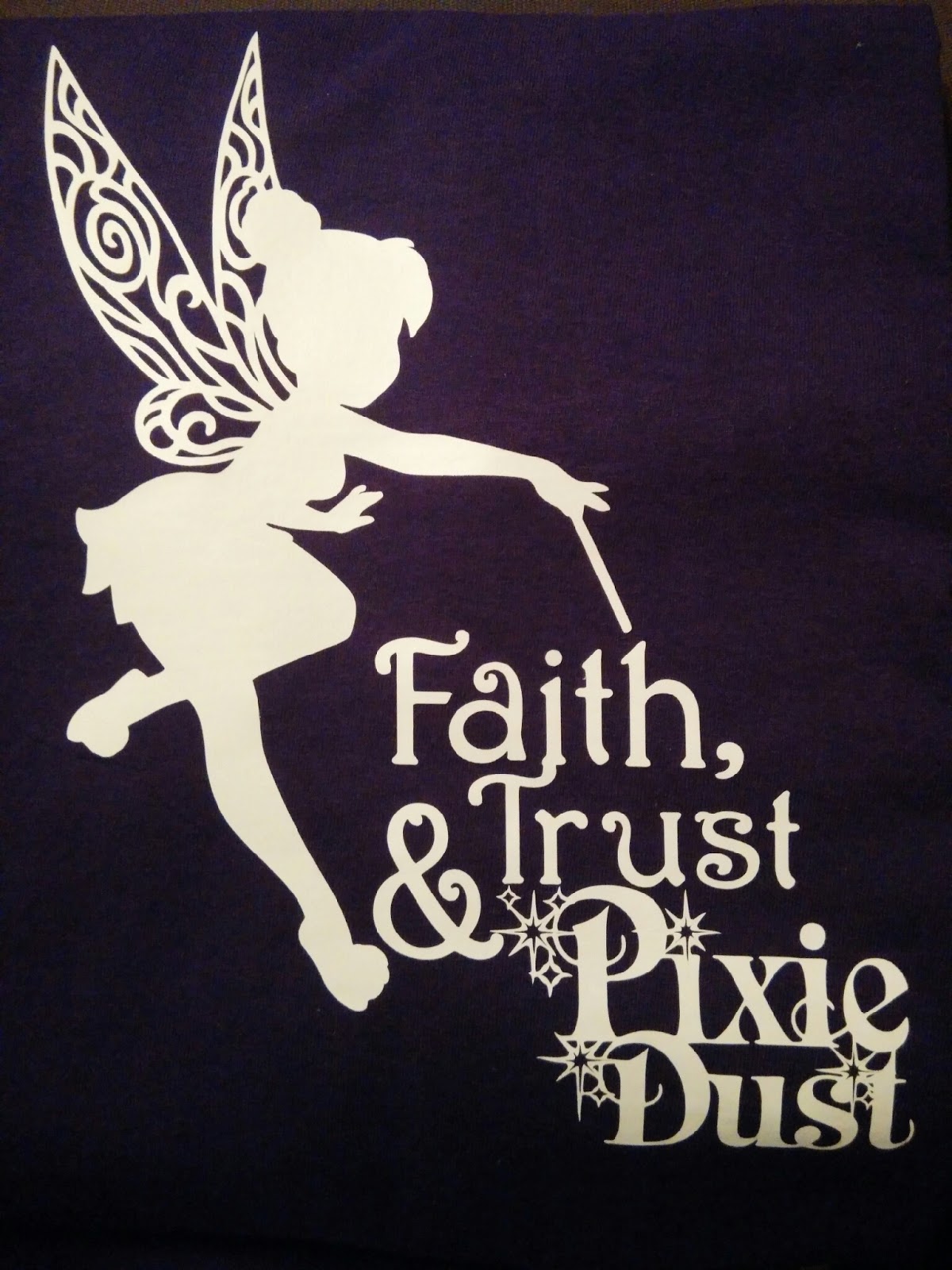
Tinkerbell shirt
You are going to see a lot of shirts over the next few weeks, as we prep for our summer trip to Disney. My bestie loves Tinkerbell and purple. She is overrun with boys in her home, so something this girly is few and far between.
I made this in Cricut Craft Room using the Tinkerbell and Friends (Tink fillagree and "Pixie Dust") and Nursery Rhymes ("faith, trust &") cartridges. Instead of having to cut each part and try to line them up during the ironing process, I put everything onto one mat and, after selecting the entire image, flipped it right in the program. It cut the whole thing on a 12x12 sheet of vinyl. It took a lot of work to weed out the wings and the sparkles but it was gorgeous, and turned out beautifully. I can't wait to send it to her and will absolutely demand a pic of her wearing it. I am not sure if there is still sharing on the Craft Room designs or if it is only sharing in Design Space now, but let me know if anyone is interested, and I will be happy to try sharing it.
UPDATE: I have been asked for this file so many times. I have tried to transfer it to Design Space, now that CCR no longer works. I had no luck, so I decided to recreate it in Cricut Design Space. Here is the link to the public file. Hope you can access it here and enjoy!
Thanks for looking! April
I made this in Cricut Craft Room using the Tinkerbell and Friends (Tink fillagree and "Pixie Dust") and Nursery Rhymes ("faith, trust &") cartridges. Instead of having to cut each part and try to line them up during the ironing process, I put everything onto one mat and, after selecting the entire image, flipped it right in the program. It cut the whole thing on a 12x12 sheet of vinyl. It took a lot of work to weed out the wings and the sparkles but it was gorgeous, and turned out beautifully. I can't wait to send it to her and will absolutely demand a pic of her wearing it. I am not sure if there is still sharing on the Craft Room designs or if it is only sharing in Design Space now, but let me know if anyone is interested, and I will be happy to try sharing it. UPDATE: I have been asked for this file so many times. I have tried to transfer it to Design Space, now that CCR no longer works. I had no luck, so I decided to recreate it in Cricut Design Space. Here is the link to the public file. Hope you can access it here and enjoy!
Thanks for looking! April
Thursday, March 10, 2016
Wall-E shirts
So we are finally heading back to the Disney World parks for the first time in six years. I am so excited, as our youngest had just started walking last time. He has come so far over the last couple of years and he can really appreciate the trip this time. I am making each family member shirts. (Look for our family shirts is a coming post.)
My boys asked for a couple extra shirts, and when Michael's puts the shirts on for $1.99, how can I resist?
My sweet hubby treated me to an upgrade on my Cricut, so I now have the Expression. I know, it's not the newest or most advanced, but I still prefer having the keyboard. (The new Explore requires computer access to use.) NOTE: The Expression will not work with Cricut's Design Space, but still works with Cricut Craft Room. I have found it is much more user-friendly than the old Design Studio on CD. It will link to a gypsy but a word of caution, once you link a cartridge, it cannot be linked to any other Cricut device. If you need to reassign your cartridges to Craft Room or Design Space, you will need to contact Cricut and have them manually moved by one of the Customer Service members.
Without further delay, here is Wall-E! I did not have enough vinyl to make a large character, so I used scraps. I used the Wall-E icon from the Best of Pixar cartridge. It cuts a large rectangle with curved corners, but I weeded out the oval and used the lettering. I was so excited about my idea, I forgot to flip the image! Not wanting to waste the vinyl, I came up with an alternative....mirror images! I used the last of my scraps to cut the icon (flipped this time!) and cut a tiny 2 inch Wall-E silhouette. Cricut has a helpful little chart online with how to kiss cut and popular placements on different clothes. I put the Wall-E icon up the right side of the shirt, with the red dot up by the shoulder. I used the oops cut on the back in the same spot, so when you hold up the shirt, they match up. I placed the little Wall-E cut near the collar on the back yoke. It came out so cute and my 13 year old thinks it's sporty. Thanks for looking! April
My boys asked for a couple extra shirts, and when Michael's puts the shirts on for $1.99, how can I resist?
My sweet hubby treated me to an upgrade on my Cricut, so I now have the Expression. I know, it's not the newest or most advanced, but I still prefer having the keyboard. (The new Explore requires computer access to use.) NOTE: The Expression will not work with Cricut's Design Space, but still works with Cricut Craft Room. I have found it is much more user-friendly than the old Design Studio on CD. It will link to a gypsy but a word of caution, once you link a cartridge, it cannot be linked to any other Cricut device. If you need to reassign your cartridges to Craft Room or Design Space, you will need to contact Cricut and have them manually moved by one of the Customer Service members.
![]() |
| front of shirt |
![]() |
| back of shirt |
Sunday, July 18, 2010
Shower Caddy
My preteen couldn't figure out where all her shower products kept disappearing to...until she found out her brothers were using it for fingerpaint in the tub....yeah. So back to school things are cropping up at Walmart and I found this cute pink shower caddy for $3. I figured she can cart it back to her room and hide her favorite goodies from her "little bothers" as she calls them. I pulled out the Cricut and vinyl for a little personalization. The "M" is cut at 2 inches from Jasmine font and the flourish is from Ashlyn's Alphabet and cut at 1 inch. Anyway, to cut vinyl, you set your blade on 6, then pressure on 2. Speed of cut depends on the complexity of the design. The letter I cut on speed 5, but the flourish I cut at 3. Simple but cute. Thanks for looking! April
Subscribe to:
Posts (Atom)